The factory passcode on the electronic safes sold here is 1234, and the button that resets the code sits inside the safe door, so the door has to be open before you can reach it. That means a reset is the way you change a code you already use, and it is not the way back in if the safe is shut and will not open.
If the safe is closed and the keypad is not letting you in, two things will open it and a reset is neither of them: the emergency key supplied with the safe, and the external power contact on the unit. Our guide to an electronic safe that will not open goes model by model through those two routes. This page is the other job: setting and changing the code on a safe you can already open.
Before you start: what you need
-
The safe open, because the reset button is on the inside of the door and cannot be reached any other way
-
The emergency key, so that the door cannot shut on you part way through
-
The printed manual that came with your safe. It is where the hold time and the code entry window for your model are written, and those timings are not the same on every model
-
A few minutes without interruption
If you are not sure which model you have, the maker's plate inside the safe door carries the model number. If you are replacing a safe rather than reprogramming one, the digital safes and cabinets collection lists every model with its price.
How to change the code on an electronic safe
One action per step. Do all of it with the door standing open.
-
Open the safe with the code you have now, or with the emergency key.
-
If it has never been reprogrammed, the code is 1234. That is the factory passcode on the safes we sell, and it is the first thing you should change.
-
Prop the door open and leave it open until the last step.
-
Find the reset button on the inside of the door. Your manual says where on your model; it is the only place it can be.
-
Press the reset button, then key in the new code. How long to hold the button, and how long you have to type the new code, are printed in your safe's own manual. We will not print a number here, because no safe on this site records one and the figure differs between models.
-
Confirm the new code the way the manual tells you to, usually by entering it a second time.
-
Test the new code twice with the door still open. Only then close the safe.
Change 1234 on the first day the safe is in the house. It is the one code that is the same on every unit that leaves the shop, and changing it takes a minute with the door open.
Locked out already? A reset cannot help you
This is the part that is worth being blunt about. The reset button is on the inside of the door. If the safe is locked and the keypad will not accept anything, you cannot reach the reset button, so no reset sequence of any kind will open it.
What does open it:
-
The emergency key. It is supplied with the safe. Keep it somewhere that is not inside the safe.
-
The external power contact. Putting power into it runs the keypad for long enough to key your code in, which is the route that matters when the cells have gone flat.
Those two routes, and which of them each listed model records, are set out in our page on a safe that will not open.
Wrong code a few times? Wait a few minutes
Enter the wrong code repeatedly and the safe stops answering the keypad for a few minutes. It then allows you to try again. It is doing what it is designed to do, and the only thing that makes it worse is carrying on pressing.
So: stop, wait, come back to it. If you are waiting anyway, that is the moment to find the emergency key rather than the moment to look for a reset sequence online.
How many codes can each safe hold?
Changing a code and adding a second code are different jobs, and how many separate codes a unit holds is the figure that decides whether everyone in the house can have their own. These are read from the product listings in Kuwait today.
| Safe | Fingerprints | Code sets | Lowest listed price |
| Smart safe drawer, 48 to 87 cm wide | 40 | 10 | 39.950 KD |
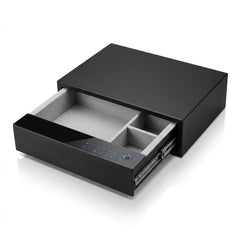
| Digital fingerprint drawer safe, 460 x 410 x 155 mm | 40 | 10 | 109.950 KD |
| Smart safe locker, 1 to 3 drawers | 100 | 1 | 89.950 KD |
| Electronic safe locker, 9 kg, 250 x 350 x 280 mm | 30 | Listing states none | 22.000 KD |
The three drawer locker is the one to read twice: its own specification field says 100 fingerprints and exactly one password. If four people each need a code rather than a fingerprint, that single figure rules it out before anything else does.
The smart safe drawer starts at 39.950 KD for the 48 x 40 x 15 cm size and runs to 77.000 KD at 87 x 40 x 15 cm. Its listing records two mechanical keys, a USB cable and an installation manual among the things in the box, and it states that the front panel is not included, so it is fitted behind a drawer front of your own.
Changing the code without the manual
The manual is where the timings live, so losing it is a real problem rather than a small one. What still works:
-
Read the model number off the plate inside the door and search for that model's own manual. Most makers publish them.
-
Use the maker's own support page rather than a forum, because the sequence is specific to the model.
-
If the safe was bought used or came with the flat, the factory passcode of 1234 is still worth trying first, in case nobody ever changed it.
Avoid the videos that promise a universal reset code. There is no such thing: the sequence is set by the maker and the model, and typing someone else's sequence repeatedly is read by the keypad as wrong codes, which is how you end up waiting out a lockout you did not need. If you are weighing up a replacement instead, our guide to whether a digital lock safe is worth buying covers what the listings do and do not tell you.
Common mistakes when changing a safe code

-
Closing the door first. Everything in this process happens with the door open, because that is the only position from which the reset button exists.
-
Leaving 1234 in place. It is the factory passcode on every unit, so it is the first code anyone would try.
-
Not testing the new code before closing up. Two tests with the door open cost nothing.
-
Retrying straight after a lockout. The few minutes have to pass. More presses do not shorten them.
-
Keeping the emergency key inside the safe. It is the thing that opens the safe when nothing else does, so it belongs somewhere else entirely.
-
Expecting a reset to get you in. It will not. The button is inside the door.
What the listings do not tell you, and what we will not guess
Not one safe listed on this site records the button sequence to set or clear a code, how to enrol or delete a fingerprint, or how long a lockout lasts in minutes. Only one of them lists a manual among the things in the box. So for your model, the printed sheet that came with it is the only place the sequence and the timings exist, and that is why this page sends you to it instead of inventing a number.
Key takeaways
-
The factory passcode is 1234. Change it on the first day.
-
The reset button is inside the door, so every step happens with the door open.
-
If you are locked out, the way in is the emergency key or the external power contact, not a reset.
-
Wrong entries lock the keypad for a few minutes, then it lets you try again.
-
Hold times and entry windows come from your model's own manual. No safe listing on this site records them.
-
Code capacity runs from one code set to ten depending on the model, which is the figure to check if several people need their own.
Conclusion

Changing the code on an electronic safe is a five minute job with the door open, the manual in your hand and the emergency key on the table. The part worth remembering is the part most pages get wrong: the reset button lives inside the door, so a reset changes a code you already have and never opens a safe you are shut out of.
You can see all of these units at the showroom at Shuwaikh Plaza, Khalifa Al-Jassim Street, Shuwaikh Industrial, or compare them on Bab Al-Saif Est. If your safe will not open at all, contact us before you try anything with a tool.
FAQs
What is the factory code on an electronic safe?
On the electronic safes sold at Bab Al-Saif it is 1234. Change it on first use, because it is the same on every unit.
Where is the reset button on an electronic safe?
Inside the safe door. You can only reach it with the door open, which is why a reset is for changing a code rather than for getting back in.
Can I reset my safe code if I am locked out?
No. The reset button is behind the closed door. Use the emergency key supplied with the safe, or put power into the external power contact so the keypad runs long enough to accept your code.
What happens if I type the wrong code too many times?
The safe stops answering the keypad for a few minutes and then allows you to try again. Waiting is the whole remedy.
Is there a universal reset code for electronic safes?
No. The reset sequence is specific to the maker and the model. The only code that is common across the safes we sell is the 1234 the unit arrives with.
Can I change a safe code without the manual?
You can try, but the hold time and the entry window are in the manual and they differ between models. Find the model number on the plate inside the door and get that model's own manual rather than following a generic sequence.
How many codes can a home safe in Kuwait store?
It depends on the model. The two drawer safes listed here each store 10 code sets and 40 fingerprints, the three drawer locker stores 100 fingerprints but only one password, and the 22.000 KD electronic safe locker states 30 fingerprints and no code figure at all.
Which safe should I buy if I want one that is not obviously a safe?
A fingerprint drawer fitted behind your own drawer front, or the smart bedside table with a fingerprint compartment at 37.950 KD, which is a 50 x 40 x 47 cm bedside table with a locked compartment rather than a safe. Our guide to choosing a bedside table in Kuwait covers sizing and placement.